VEO3 Video Prompt Generator
Create professional AI video prompts in seconds with our free VEO3 Video Prompt Generator. Whether you’re producing cinematic scenes, product commercials, social media videos, short films, animations, educational content, or realistic AI-generated footage, our tool helps you generate detailed prompts designed to maximize the quality of AI video generation.
A detailed prompt using camera, shot, lighting, style and scene settings.
Generated VEO3 prompt
Prompt check
What went into this prompt
Your prompt history lives here
Sign in to save VEO3 prompts, search them later and pick them up on any device. You can keep generating and copying prompts without an account.
Sign inSimply describe your idea, and our VEO3 Prompt Generator transforms it into a structured video prompt complete with scene descriptions, camera movements, lighting, environment, character actions, visual style, pacing, mood, and cinematic details. Instead of guessing how to describe your vision, you get an optimized prompt ready to use with Google’s VEO 3 and other modern AI video generation models.
Designed for content creators, marketers, filmmakers, agencies, educators, developers, and businesses, our VEO3 Video Prompt Generator makes professional prompt creation fast, simple, and completely free.
What is a Video Prompt Generator?
A video prompt generator is an AI-powered tool that converts simple ideas into detailed prompts specifically designed for AI video generation models. Rather than writing long, complex instructions yourself, the generator expands your concept into a structured prompt that helps AI better understand every aspect of the video you want to create.
Modern AI video models perform best when prompts include detailed information about the subject, environment, movement, camera angles, lighting, artistic style, emotions, and timing. Our VEO3 Video Prompt Generator automatically incorporates these essential elements to produce prompts that generate higher-quality videos.
Whether you’re creating marketing content, cinematic storytelling, product demonstrations, YouTube Shorts, TikTok videos, Instagram Reels, educational animations, or promotional videos, our generator helps transform your ideas into professional AI video prompts.
Why Use Our VEO3 Video Prompt Generator?
Creating effective video prompts manually can require considerable time and an understanding of both prompt writing and visual storytelling. Our generator simplifies the process by transforming basic concepts into detailed prompts with relevant cinematic and visual information.
Faster Prompt Creation
Turn a simple idea into a detailed video prompt without spending hours manually writing and organizing every instruction.
VEO3-Optimized Prompts
Create structured prompts around important video-generation elements such as scenes, camera movement, lighting, character actions, visual style, and atmosphere.
Better Cinematic Direction
Add camera movements, composition, lighting, atmosphere, and visual details to give your video concept stronger cinematic direction.
Beginner Friendly
Create detailed video prompts without needing advanced prompt engineering or filmmaking experience.
Free and Easy to Use
Generate professional video prompts quickly without complicated setup, registration, or subscription fees.
How to Generate a VEO3 Video Prompt
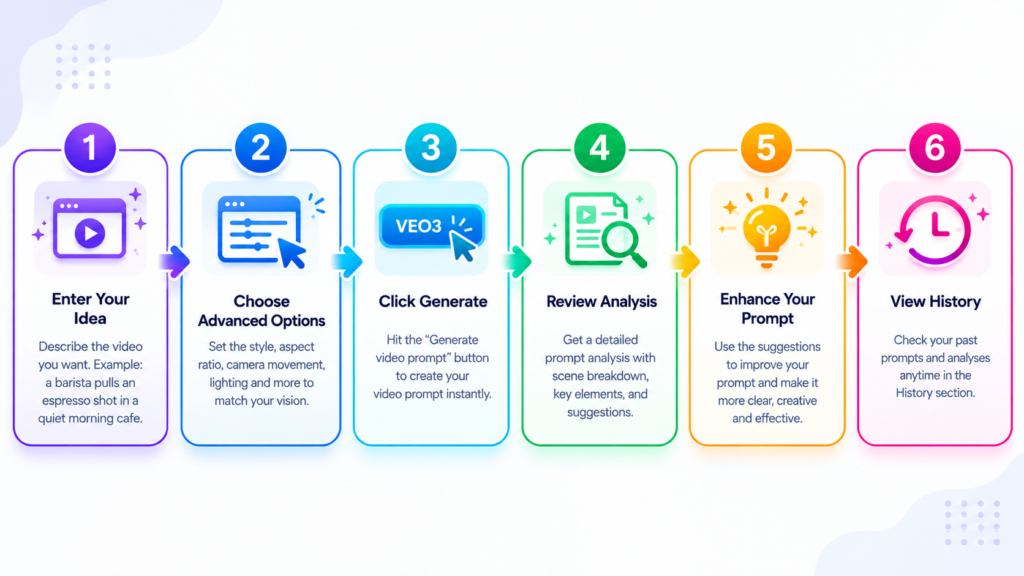
Creating a detailed VEO3 video prompt takes only a few simple steps.
Describe Your Idea
Start by explaining your video concept using natural language. Include the subject, setting, characters, actions, mood, or any creative details that are important to your idea.
Choose Your Video Style
Select a visual direction that matches your project, such as cinematic, realistic, commercial, documentary, animated, dramatic, or stylized.
Select Video Settings
Define relevant video requirements such as format, duration, camera perspective, aspect ratio, and other settings that fit your project.
Generate Your Prompt
The generator transforms your description into a detailed, structured video prompt by adding essential elements such as camera movements, cinematic composition, lighting, scene descriptions, character actions, visual style, motion details, background environment, atmosphere, color grading, and video quality enhancements. The final result is a polished prompt ready to use in your VEO 3 workflow.
Review and Customize
Review your generated prompt and adjust the scene, characters, actions, camera direction, visual style, lighting, motion, or other details to match your creative vision.
Copy & Create Your Video
Copy your completed prompt and use it with VEO3 or another compatible AI video-generation platform. You can continue refining the prompt until it matches the video you want to create.
What Makes a Great VEO3 Video Prompt?
A strong video prompt provides enough information to communicate the scene, action, and creative direction clearly. The right combination of visual, cinematic, and storytelling details can make your concept more structured and easier to translate into a video.
Clear Scene Description
Describe where the scene takes place, what is visible, who or what appears in the shot, and the overall situation.
Camera Movement
Explain how the camera should move or frame the scene, such as through tracking shots, pans, zooms, close-ups, wide shots, or aerial perspectives.
Character Actions
Clearly describe what characters or subjects are doing, including movements, interactions, expressions, and important gestures.
Lighting & Atmosphere
Specify lighting conditions, time of day, weather, shadows, atmosphere, and other elements that establish the visual mood.
Style & Visual Quality
Define the desired visual direction, such as cinematic, realistic, documentary, commercial, animated, or stylized, along with relevant quality characteristics.
Audio & Dialogue
Include spoken dialogue, narration, ambient sounds, music direction, or sound effects when audio is an important part of the scene.
Features
VEO3-Optimized Prompt Generation
Transform simple concepts into structured prompts containing important visual, cinematic, and storytelling details.
Cinematic Scene Builder
Build richer scenes by combining subjects, environments, actions, camera direction, lighting, and atmosphere.
Camera Movement Suggestions
Add useful camera movements and shot descriptions to give your video concepts stronger visual direction.
Character & Action Descriptions
Create clearer descriptions of characters, subjects, movements, interactions, and expressions.
Style & Mood Controls
Guide the overall visual style, tone, atmosphere, and mood of your video prompt.
Multiple Video Formats
Create prompts for different video formats and creative requirements, including landscape, portrait, and other common formats.
One-Click Copy
Copy your completed VEO3 prompt instantly and use it in your preferred video-generation workflow.
Save Prompt History
Save and revisit generated prompts so you can reuse, edit, or develop previous video concepts. Prompt history and saving require an account.
Perfect for Every Video Project
Marketing Videos
Create structured prompts for advertising campaigns, brand videos, promotional content, and marketing concepts.
Product Commercials
Develop cinematic product showcases with detailed scenes, lighting, camera movement, and visual presentation.
YouTube Content
Create prompts for YouTube videos, Shorts, explainers, storytelling, and other video content.
Social Media Reels
Generate engaging video concepts for short-form content designed for social media platforms.
Educational Videos
Create prompts for tutorials, demonstrations, lessons, presentations, and visual explanations.
Storytelling & Short Films
Turn story ideas into cinematic scenes with characters, actions, environments, camera movements, and atmosphere.
Animation Concepts
Develop prompts for animated scenes, character concepts, creative sequences, and stylized visual storytelling.
Explore our Image Prompt Generator and DeepSeek Prompt Generator to create optimized prompts for visual content, research, coding, and advanced AI tasks.
Video Prompt Generator Guide
Frequently Asked Questions
Start Creating Better AI Video Prompts Today
Turn your video ideas into detailed prompts with clear scenes, camera movements, character actions, lighting, atmosphere, visual style, and cinematic direction. Whether you’re creating advertisements, product showcases, short films, educational content, social media videos, or creative storytelling, our VEO3 Video Prompt Generator makes prompt creation faster and easier.
Describe your idea, generate a structured prompt, customize the result, and start building your next AI video with confidence.