Free Google Gemini Prompt Generator
Create Better Prompts for Gemini
Create smarter, clearer, and more structured prompts for Google Gemini with our free Gemini Prompt Generator. Whether you’re using Gemini for writing, coding, research, data analysis, business tasks, brainstorming, document analysis, or multimodal projects, our tool transforms simple ideas into detailed prompts designed to make your instructions easier to understand and refine.
Google’s current Gemini family includes models with context windows of 1 million tokens or more, making it possible to work with very large amounts of information such as long documents, extensive code, and other large datasets. This makes prompt structure and context management especially important when your request involves substantial information.
Simply describe what you want to accomplish, and our Gemini Prompt Generator organizes your idea into a prompt with a clear objective, relevant context, instructions, constraints, and desired output format.
What Is a Gemini Prompt Generator?
A Gemini Prompt Generator is a tool that converts a simple idea or task into a structured prompt designed for Google Gemini. Instead of manually figuring out how to define your role, objective, context, requirements, examples, and output format, you can describe your goal in natural language and let the generator organize the request.
Google’s own prompt-design guidance recommends clear and specific instructions, consistent structure, defined parameters, and explicit output requirements. Google also recommends iterative testing and refinement because prompt engineering is an ongoing process. A well-structured Gemini prompt can include
By combining these elements, our Gemini Prompt Generator helps you create clearer prompts for writing, coding, research, business, education, data analysis, and other workflows.
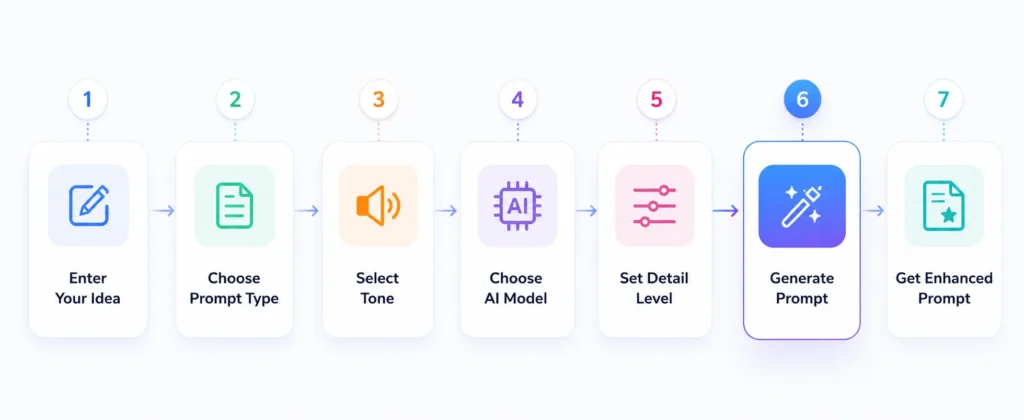
How to Generate a Gemini Prompt
Creating a structured Gemini prompt takes only a few simple steps.
Describe Your Goal
Start by explaining what you want Gemini to accomplish. You don’t need to write a perfect prompt—describe your objective in ordinary language.
Add Context & Requirements
Provide the information Gemini needs to understand the task. This can include your audience, business background, source material, examples, limitations, preferred tone, required sections, or specific instructions. For large-context tasks, Google’s guidance recommends placing the relevant context first and putting the specific question or instruction at the end.
Generate Optimized Prompt
The generator transforms your idea into a structured prompt containing relevant instructions, context, requirements, and output expectations. For complex tasks, the prompt can also use clearly separated sections such as Context, Task, Constraints, and Output Format.
Review and Customize
Review the generated prompt before using it. You can modify the objective, tone, examples, formatting requirements, or constraints to match your exact needs. Google describes prompt engineering as an iterative process, meaning testing and refining prompts is an important part of achieving better results.
Copy and Use
Copy the finished prompt and use it with your preferred Gemini workflow, including compatible Google AI environments. Google AI Studio, for example, provides tools for experimenting with prompts and offers settings for structured output, function calling, code execution, and grounding.
What Makes a High-Quality Gemini Prompt?
A strong Gemini prompt gives the model enough information to understand what you want without leaving important requirements ambiguous.
Context
Explain the background of your task. Relevant context helps Gemini understand the information surrounding your request. For example, instead of “Analyze this report.” “Analyze this quarterly sales report for a retail business and identify the three largest revenue changes, possible causes, and recommended actions.”
Clear Objective
Clearly state what Gemini should accomplish. Use specific instructions such as
Clear instructions are one of Google’s core recommendations for Gemini prompting.
Style & Tone
Tell Gemini how the response should sound. Examples include:
Response Format
Define how you want the answer presented. You can request:
Constraints & Requirements
Add important limitations or rules, such as word count, target audience, required information, formatting, sources, exclusions, or business requirements. This is particularly useful when creating professional, technical, or repeatable workflows.
Gemini vs. ChatGPT: Why Prompting Can Differ
|
Feature |
Gemini |
ChatGPT |
|---|---|---|
|
AI System |
Google’s AI system with capabilities that vary by model and API |
OpenAI’s AI system with capabilities that vary by model and platform |
|
Prompting |
Prompts may need to be adapted to Gemini’s model and the specific task |
Prompts may need to be adapted to ChatGPT’s model and the specific task |
|
Multimodal Support |
Supports combinations of text and media, including images, audio, video, and PDFs depending on the model and API |
Supports multimodal workflows depending on the model and available features |
|
Large Context Windows |
Current Gemini models can offer context windows of 1 million tokens or more |
Context-window size varies by model |
|
Best Use for Large Content |
Useful for workflows involving very large documents, codebases, and mixed media |
Suitable for a wide range of conversational, analytical, coding, and content-generation tasks |
|
Key Consideration |
Prompting and workflow design should be tailored to the Gemini model and task |
Prompting and workflow design should be tailored to the ChatGPT model and task |
Who Can Benefit From Optimized Gemini Prompts?
Data Analysts
Create structured prompts for analyzing spreadsheets, reports, datasets, trends, and business information.
Developers
Build prompts for coding, debugging, technical explanations, code reviews, software development, and programming workflows.
Content Writers
Create prompts for articles, blog posts, scripts, emails, social media content, rewriting, research, and content planning.
Researchers & Students
Use structured prompts for summarizing papers, organizing research, comparing information, explaining difficult concepts, and creating study materials.
Businesses & Marketers
Develop prompts for marketing campaigns, customer research, business reports, product analysis, strategy development, and content workflows.
Gemini Prompt Generator Features
Structured Prompt Generation
Turn simple ideas into organized prompts containing objectives, context, instructions, requirements, and expected outputs.
Context & Role Guidance
Add relevant background information and role instructions to help define how Gemini should approach a task.
Multimodel Prompt Support
Create prompts for workflows involving different types of information, including text and supported media inputs. Prompts for Gemini’s multimodal input capabilities.
Controls Output
Create prompts that request specific formats such as tables, JSON, Markdown, reports, bullet lists, or code.
Tone & Style
Specify professional, technical, academic, creative, conversational, persuasive, or other writing styles.
Detailed Instructions
Add requirements, examples, constraints, quality standards, and step-by-step instructions for more complex tasks.
Workflow Support
Create structured prompts for multi-stage tasks such as analyzing information, generating recommendations, checking results, and presenting a final response.
Gemini Prompt Tips for Better Results
Be Clear and Direct
State your objective clearly and avoid unnecessary wording. Google’s current Gemini prompting guidance emphasizes precise, direct instructions.
Provide Relevant Context
Give Gemini the information it needs instead of assuming it already understands your situation.
Use Examples
Few-shot examples can demonstrate the format, style, or type of answer you expect. Google recommends examples as a useful prompting technique.
Define the Output
Tell Gemini exactly what you want returned—for example, a table, checklist, JSON object, report, or numbered steps.
Separate Large Content
When working with large documents or datasets, Google recommends providing the context first and placing the specific question or instruction afterward.
Refine Your Prompt
Don’t expect every prompt to be perfect on the first attempt. Test the generated prompt, review the response, and refine the instructions based on what you observe.
How use Google Gemini Prompt Generator Guide
Frequently Asked Questions
Start Creating Better Gemini Prompts Today
Turn simple ideas into structured prompts designed for Google Gemini. Describe your goal, add the relevant context, generate an optimized prompt, review the result, and copy it into your preferred Gemini workflow. Whether you’re writing content, analyzing large documents, developing software, researching a topic, working with data, or building a business workflow, our free Gemini Prompt Generator helps you create clearer and more useful prompts in seconds.