

DeepSeek Prompt Generator
Create Better DeepSeek Prompts for Free
Unlock the full potential of DeepSeek with our free DeepSeek Prompt Generator. Whether you’re writing articles, generating code, conducting research, solving technical problems, creating marketing campaigns, or handling business tasks, our tool helps you create clear, structured prompts designed to produce more useful AI responses. Instead of spending time experimenting with different wording, simply describe your objective. Our DeepSeek Prompt Generator transforms your idea into a structured prompt with clear instructions, relevant context, requirements, constraints, and output expectations.
DeepSeek has gained significant attention for its reasoning-focused AI models. The release of DeepSeek-R1 in January 2025 particularly increased interest in AI reasoning for tasks such as mathematics, coding, and complex problem solving. Designed for beginners and professionals alike, our tool makes prompt creation simple, fast, and free—with no registration required.
Let Our Prompt Generator Surprise You
Every effective AI interaction starts with a clear objective. Simply type your idea, describe your task, or explain what you want DeepSeek to accomplish. Our generator transforms your initial request into a more structured prompt by organizing the objective, context, instructions, requirements, and desired output. This approach reduces ambiguity and gives DeepSeek clearer information about what you expect.
Whether you’re writing content, developing software, analyzing information, solving technical problems, or brainstorming ideas, you can start with a simple description and build a more detailed prompt in seconds.
What Is a DeepSeek Prompt Generator?
A DeepSeek Prompt Generator is a tool that transforms a simple idea or instruction into a structured prompt designed for DeepSeek. Instead of manually creating long instructions, you provide the basic objective, and the generator organizes it into a clearer format. A strong DeepSeek prompt can include:
This structure is particularly useful for complex requests involving multiple requirements or several stages of work.
How to Use the DeepSeek Prompt Generator
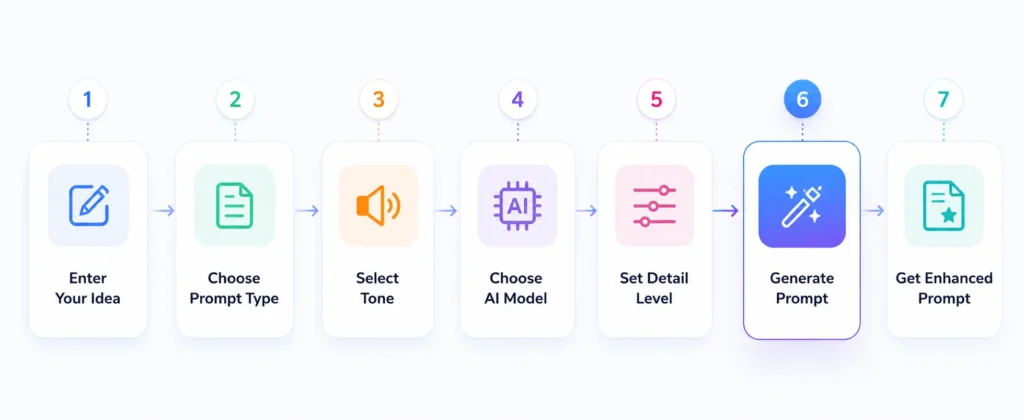
Creating a professional DeepSeek prompt takes only a few steps.
Enter Your Idea
Describe what you want DeepSeek to accomplish using natural language. For example: “Create a marketing strategy for a new skincare brand targeting customers aged 18–30.” You don’t need to know advanced prompt engineering techniques before getting started.
Choose Your Goal
Define the type of result you want. Like a blog article, product description, marketing strategy, business report, email, code, research summary, lesson plan, SEO content, and data analysis.
Add Details
Provide additional information that can make the prompt more specific. Useful details include target audience, keywords, technical requirements, formatting requirements, word count, and industry.
Generate
The generator organizes your information into a structured prompt containing elements such as objective, context, instructions, and output format.
Copy & Use
Copy the generated prompt and paste it into DeepSeek. You can also edit the prompt before using it if you want to add additional requirements or context.
Best DeepSeek Prompt Structure
Effective prompts generally provide the model with enough information to understand both what needs to be done and what a successful result should look like.
A practical structure is Role → Context → Task → Requirements → Constraints → Output Format
Simple DeepSeek Prompt Template
Role: Act as a [professional/expert].
Context: I am working on [background].
Task: Help me [specific objective].
Requirements: Include [specific requirements].
Constraints: Follow [limitations].
Output: Present the result as [desired format].
This framework can be adapted for writing, coding, research, marketing, education, business, and many other tasks.
DeepSeek Models and Reasoning Capabilities
DeepSeek’s model family includes general-purpose and reasoning-focused models. DeepSeek-R1 was released in January 2025 and attracted considerable attention for reasoning-oriented tasks including mathematics, programming, and complex problem solving.
DeepSeek’s broader model ecosystem includes different models and variants designed for different workloads. Because capabilities and technical specifications can vary between models and releases, users should select the model that best matches their particular task.
For reasoning-heavy tasks, prompts should clearly define the problem, relevant information, constraints, and expected result. For coding tasks, providing the programming language, environment, existing code, expected behavior, and error information can make the request substantially more actionable.
Our generator focuses on the prompt itself, helping you organize these elements before submitting your request to DeepSeek.
DeepSeek Prompts for Every Use Case
Prompts for Business
Create prompts for:
Prompts for Marketing
Create structured prompts for:
Prompts for SEO
Generate prompts for:
Prompts for Writing
Create prompts for:
Prompts for Coding
Developers can create prompts for:
Prompts for Research & Study
Create prompts for:
DeepSeek Prompt Best Practices
Be Clear and Specific
Avoid vague instructions such as “Write something about marketing.” Instead, specify the topic, audience, purpose, format, and desired result. For example: “Write a 1,500-word beginner’s guide to email marketing for small business owners using a professional but conversational tone.” The second request provides substantially more information for the model to follow.
Provide Context
Useful context can include:
Assign a Role
Role instructions can help establish the perspective you want. Examples:
Define the Output Format
Specify how the response should be organized. Common formats include
Review and Improve
Prompting is an iterative process. If the first response doesn’t meet your requirements, refine the prompt by adding missing context, clarifying instructions, changing the output format, or introducing additional constraints. A better prompt can improve the direction of the response, but AI-generated information should still be reviewed for accuracy.
Key Features
100% Free
Generate DeepSeek prompts without subscription fees.
No Registration
Start creating prompts without creating an account.
Fast Response
Transform a simple idea into a structured prompt in seconds.
Beginner-Friendly
You don’t need advanced prompt engineering knowledge to get started.
Multiple Use Cases
Create prompts for writing, coding, marketing, business, SEO, research, education, data analysis, customer support, and social media.
Improve Prompts
Already have a prompt? Use the generator to reorganize and improve its clarity, context, structure, and requirements.
Tailored Prompt
Generated prompts can include roles, objectives, context, requirements, constraints, and output formats.
Copy and Use Instantly
Copy the generated prompt and paste it into DeepSeek whenever you’re ready.
Generate Better DeepSeek Prompts in Seconds
Stop repeatedly rewriting prompts and experimenting with different instructions. Our free DeepSeek Prompt Generator helps you transform simple ideas into structured prompts for writing, coding, research, marketing, business, education, SEO, and more.
Describe your objective → Generate your prompt → Copy it → Use it with DeepSeek.
No registration required and completely free to use.
How use DeepSeek Prompt Generator Guide
Frequently Asked Questions
Start Creating Better DeepSeek Prompts Today
Unlock more value from DeepSeek with professionally structured prompts designed around clear objectives, relevant context, specific requirements, and defined outputs. Whether you’re writing content, developing software, conducting research, creating marketing campaigns, analyzing information, or solving complex problems, our free DeepSeek Prompt Generator helps you communicate your requirements more effectively.
Describe your idea, generate an optimized prompt, copy it into DeepSeek, and start creating better AI responses today.