Free Claude Prompt Generator
Create smarter, more detailed, and highly structured prompts with our free Claude Prompt Generator. Whether you’re writing articles, analyzing documents, generating code, creating business reports, summarizing research, or solving complex problems, our tool helps turn your ideas into professional prompts designed for Claude.
Instead of spending time experimenting with instructions, describe what you want to accomplish and generate a structured starting prompt. The resulting prompt can organize your objective, context, requirements, constraints, examples, and desired output so you can give Claude clearer instructions.
Claude has been designed for tasks involving long documents and complex information. Anthropic introduced a 200K-token context window with Claude 2.1, describing that capacity as roughly 150,000 words or more than 500 pages of material. Current Claude models have expanded these capabilities further, making structured prompting particularly useful for document-heavy and professional workflows.
What Is a Claude Prompt Generator?
A Claude Prompt Generator is a tool that converts a simple idea or task description into a more organized prompt for Claude. Instead of manually deciding how to structure every instruction, you can provide information such as
The generator organizes these elements into a clearer instruction set that you can review and customize before using it with Claude. This is particularly useful for complex requests where several instructions need to work together. Anthropic has also highlighted the value of clearly structured prompts and examples when working with long-context tasks.
How to Generate Claude Prompts
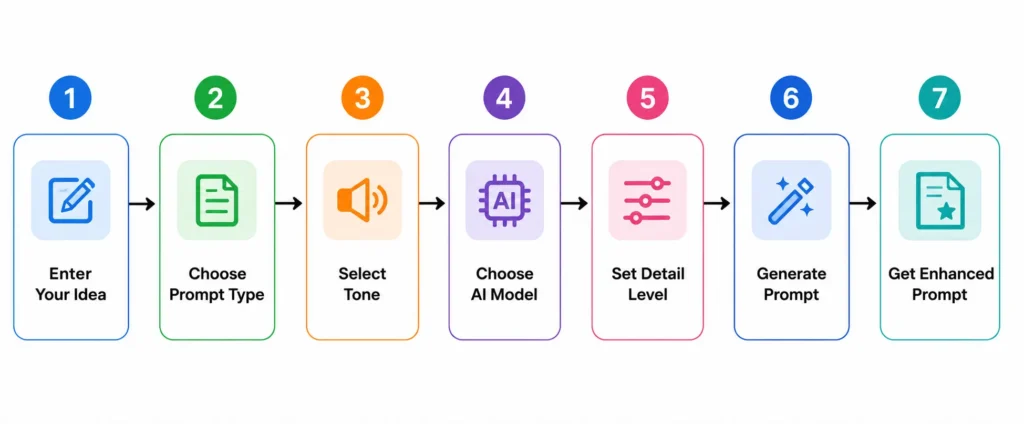
Creating an optimized Claude prompt takes only a few simple steps.
Define Your Task
Start by explaining exactly what you want Claude to accomplish. Include the primary objective, intended result, and any important details.
For example, instead of “Write about eCommerce.”
You could specify, “Create a 1,500-word beginner-friendly guide explaining how small online stores can improve their product listings.”
A defined objective gives the model a clearer target and makes the generated prompt easier to evaluate.
Choose the Right Structure
Complex requests become easier to follow when instructions are logically organized.
Depending on your task, the generated prompt can separate information into sections such as
For longer or more complex workflows, structured sections can make relationships between different instructions easier to understand.
Add Examples
Examples can show Claude exactly what you mean when a written explanation is not enough.
They can be useful for:
Anthropic has published research showing that providing relevant examples can improve recall performance when Claude is working across long contexts.
Optimize for Claude’s Strengths
Claude is particularly suited to workflows involving long documents, coding, and complex professional tasks. Anthropic’s Claude 3 family launched with a 200K-token context window.
Our generator helps you take advantage of these capabilities by encouraging prompts that clearly define the task, provide relevant context, and specify the expected result.
Test and Refine
A generated prompt should be treated as a starting point rather than a guarantee of a perfect response.
Review the prompt with our prompt checker, check whether the requirements are accurate, and modify anything that does not match your objective. You can then test the prompt in Claude and refine it based on the result.
Create Claude Prompts for Different Use Cases
Claude can be used across a wide range of professional, creative, and technical workflows. Our generator can help you create prompts for different objectives.
Business & Productivity
Create prompts for reports, planning, meeting summaries, business analysis, customer communication, documentation, and workflow tasks.
Marketing & SEO
Generate prompts for content strategies, keyword research, campaign ideas, product messaging, email marketing, and SEO content.
Content Writing
Create structured prompts for blog posts, articles, newsletters, social media content, scripts, editing, rewriting, and storytelling.
Coding & Technical Tasks
Build prompts for programming, debugging, code reviews, technical documentation, API explanations, software architecture, and development workflows.
Creative Projects
Develop prompts for brainstorming, storytelling, character development, creative concepts, scripts, and other imaginative tasks.
Research & Education
Create prompts for summarization, research analysis, study materials, explanations, comparisons, literature reviews, and educational content.
Get More Consistent Results from Claude
A good prompt is not simply longer. It should provide the right information in a structure Claude can understand and follow.
Give Clear Instructions
State exactly what you are expected to do or give the background knowledge that Claude should use instead of relying on vague requests.
Provide the Right Context
Include background information relevant to the task. Context helps Claude understand why the task information should be prioritized.
Structured Prompt Elements
Get objectives, instructions, requirements, examples, and professional prompt output if a task contains multiple components.
Include Examples When Helpful
Examples can demonstrate the expected style, structure, classification, or level of detail more effectively than instructions alone.
Define Your Output
Tell Claude whether you want a table, report, bullet list, JSON object, code, email, summary, or another format.
Claude Prompt Structure Explained
Understanding the components of a prompt can help you create better instructions even when you’re not using a generator.
Role and Objective
Define Claude’s role and clearly state the task it needs to complete.
Context and Background
Provide relevant information that Claude needs to understand the situation.
Instructions and Constraints
Explain what Claude should do and identify limitations it needs to follow.
Examples and References
Add examples when they help demonstrate the expected result.
Output Format
Specify how the final response should be organized and presented.
Why Use Our Claude Prompt Generator?
Idea into Structured Prompt
Start with a basic idea and transform it into an organized prompt containing clearer instructions, context, and output requirements.
Reduce Manual Work
Instead of constructing every prompt element yourself, generate a structured starting point in seconds.
Improve Prompt Consistency
A repeatable prompt structure can help you maintain similar standards when creating prompts for multiple tasks or projects.
Prompts for Different Tasks
Generate prompts for writing, coding, research, business, education, marketing, analysis, and creative workflows.
Beginner-Friendly Prompt
You don’t need to understand advanced prompt engineering terminology to get started. Describe your objective and refine the generated prompt.
Free and Easy to Use
Generate Claude prompts without registration or subscription requirements.
Claude Prompt Generator Features
Structured Prompt Generation
Organizes your basic request into clearly defined prompt components.
Prompt Optimization
Creates prompts designed around practical Claude prompting principles rather than simply producing generic instructions.
Multiple Use Cases
Generate prompts for professional, educational, creative, technical, research, and business tasks.
Easy Prompt Editing
Review and modify the generated prompt before using it.
One-Click Copy
Copy the finished prompt and paste it directly into your Claude workflow.
Fast Results
Turn a short description into a structured prompt without spending several minutes building the framework manually.
How to use Claude Prompt Generator Guide
Create powerful and detailed prompts with our Claude Prompt Generator for smarter AI conversations and better results. Explore the Chat GPT Prompt Generator, Image Prompt Generator, and DeepSeek Prompt Generator to create optimized prompts for every task. Whether you need text, visual, or advanced AI prompts, our tools help you generate high-quality prompts quickly and effortlessly.
Frequently Asked Questions
Start Creating Better Claude Prompts Today
Turn your ideas into clearer, more structured prompts for Claude. Whether you’re analyzing a long document, writing content, developing software, researching a topic, preparing a business report, or working through a complex task, our free Claude Prompt Generator helps you create a strong starting prompt in seconds.