AI Image Prompt Generator
Create Stunning AI Image Prompts in Seconds
Comma-tagged prompt with --ar, --style and --no parameters.
Optimized prompt
Negative prompt
Prompt check
What went into this prompt
Your prompt library lives here
Sign in to save prompts, sort them into folders and pick them up on any device. You can keep generating and copying prompts without an account.
Sign inTurn your ideas into detailed, creative, and professional image prompts with our AI Image Prompt Generator. Whether you’re creating digital art, realistic photography, concept art, anime, product mockups, illustrations, logos, or cinematic scenes, our tool transforms simple descriptions into structured prompts designed for modern text-to-image workflows.
Effective image prompting isn’t simply about adding more words. The goal is to communicate the important visual information clearly, including the subject, environment, composition, lighting, style, mood, and other details that influence the desired result.
Google’s current image-generation guidance recommends considering elements such as subject, composition, action, location, style, and editing instructions when creating image prompts. OpenAI similarly recommends focusing on the purpose, main subject, action, setting, visual style, and relevant constraints rather than making prompts unnecessarily long.
Simply describe your idea, and our Image Prompt Generator transforms it into a more structured prompt covering relevant visual elements such as subject details, artistic style, environment, lighting, composition, camera direction, colors, mood, and visual characteristics.
Designed for beginners and professionals alike, Image Prompt Generator helps artists, designers, marketers, content creators, photographers, game developers, architects, and businesses turn rough concepts into detailed visual instructions—completely free and without registration.
Research has also examined the relationship between prompt wording and text-to-image results. One published study evaluated 5,493 image generations across five experiments, investigating how prompt keywords and model parameters affected generated images across different subjects and styles.
What Is an Image Prompt Generator?
An AI image prompt generator converts simple ideas into detailed instructions for AI image-generation models. Instead of manually describing every visual element, you can provide a basic concept and use the generator to expand it into a more organized image prompt. A strong image prompt can include information about:
Organizing these elements gives the image model clearer visual direction and makes it easier to experiment with different creative concepts. Google’s Imagen documentation recommends starting with the subject, context/background, and style, then refining the prompt by adding more details as needed. Our generator helps simplify this process by turning an initial idea into a structured prompt that you can review, edit, and use with your preferred image-generation platform.
Why Use Our Image Prompt Generator?
Writing detailed image prompts manually can be difficult. Small changes in wording often produce dramatically different images. Our AI Image Prompt Generator removes the guesswork by creating clear, descriptive, and optimized prompts that help AI understand exactly what you want to create. Whether you’re generating realistic portraits, fantasy worlds, product photography, architectural concepts, fashion designs, illustrations, or social media graphics, our tool helps you create prompts that produce better visual results while saving time and effort.
Generate Prompts
Describe your idea in plain language, and our AI Image Prompt Generator instantly creates a detailed image prompt using proven prompt engineering techniques. It automatically expands your description with artistic styles, lighting, camera angles, composition, textures, colors, mood, rendering quality, and other important visual details that improve AI-generated images.
Optimized for AI
Our prompts are designed using universal prompt engineering principles that work across today’s most popular AI image generators, including MidJourney, DALL·E, Stable Diffusion, Flux, Adobe Firefly, Leonardo AI, Ideogram, Recraft, and many other text-to-image models. Simply generate your prompt, copy it, and use it with your preferred platform.
100% Free, No Sign-Up Needed
Create unlimited image prompts without creating an account or paying subscription fees. Our AI Image Prompt Generator is completely free to use, making it easy for anyone to start creating professional-quality prompts immediately.
How Does It Work?
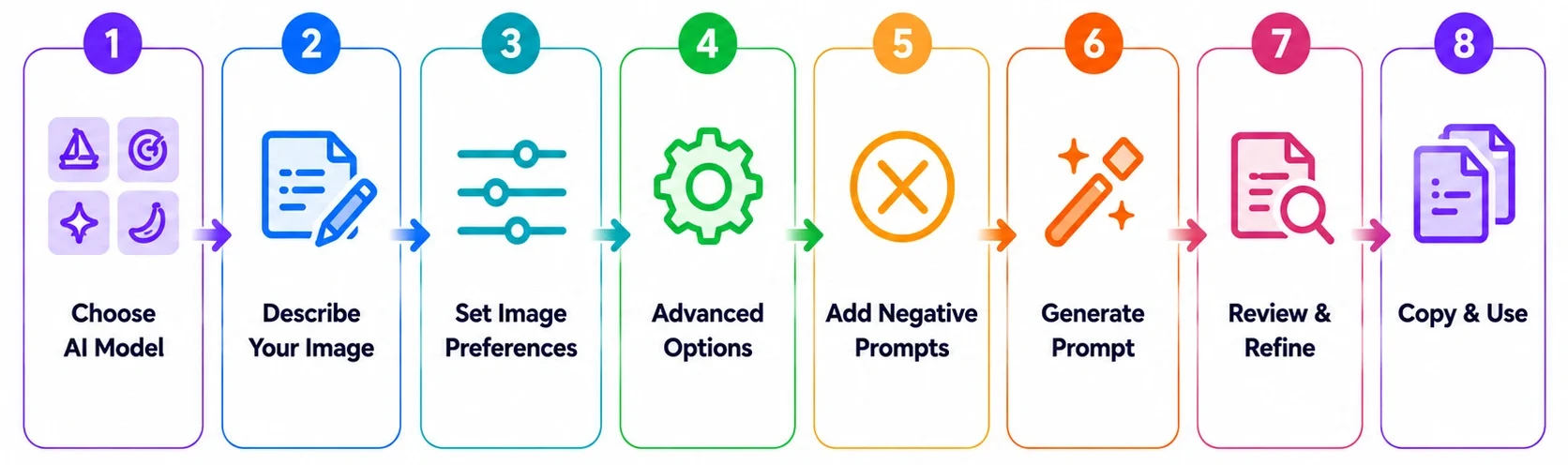
Creating high-quality image prompts takes only a few simple steps.
Describe Your Idea
Enter your concept using a few words or a short description. For example: A futuristic city at sunset. A futuristic city at sunset. You don’t need to know advanced prompt engineering techniques before using the tool.
Analyze Your Concept
The generator interprets the information in your request and identifies relevant visual elements such as the subject, setting, creative direction, and intended style.
Generate a Detailed Prompt
Your initial idea is transformed into a structured prompt that can include details such as visual style, composition, lighting, camera perspective, environment, colors, textures, mood, and rendering characteristics
Copy and Use Your Prompt
Copy the generated prompt and paste it into your preferred image-generation platform.
Refine Your Prompt
Image generation is often an iterative process. If the first result isn’t what you expected, modify the prompt by adding or changing important details.
Google’s image-generation documentation specifically recommends starting with a core idea and progressively refining it with additional details. By combining these elements intelligently, our AI Image Prompt Generator helps you achieve higher-quality results while reducing trial and error.
Features:
What Makes a Great AI Image Prompt?
A useful image prompt provides enough visual direction for the model to understand what you want without introducing unnecessary or conflicting instructions. Different projects require different information, but the following elements can help create a stronger prompt.
Define the Main Subject
Clearly describe the person, object, character, product, location, animal, or primary focus of the image. Instead of: A car. Try: A matte-black electric sports car with aerodynamic bodywork. The additional details give the image model a clearer understanding of the subject.
Choose the Visual Style
Specify the desired artistic direction. Examples include:
Describe the Environment.
Explain where the subject exists and provide enough environmental detail to establish the setting and context of the scene. You can describe the location, background, weather conditions, architecture, landscape, interior design, time of day, and surrounding objects. These details help create a more immersive and visually consistent environment while supporting the subject and overall composition.
Set Lighting and Atmosphere
Lighting can significantly affect the appearance and mood of an image. You can specify:
Guide Composition and Perspective
Explain how the scene should be framed, including the desired camera angle, shot type, and overall composition. Common options include a close-up, medium shot, wide shot, low-angle view, high-angle view, over-the-shoulder view, bird’s-eye view, three-quarter view, or centered composition.
Add Camera and Technical Details
For realistic photography prompts, you can include camera and technical details such as the lens type, focal length, depth of field, focus, camera perspective, shutter speed or aperture characteristics, and overall photography style. These details are particularly useful when the desired visual outcome depends on specific photographic qualities, such as realistic depth, sharp subject focus, natural background blur, cinematic composition, or professional editorial photography.
Specify Colors, Textures, and Mood
Describe the important visual qualities of the scene, including the color palette, materials, surface textures, emotional tone, atmosphere, contrast, and saturation. These details help establish the overall visual character and ensure the generated image has the desired mood, depth, and aesthetic consistency.
Include Quality and Rendering Details
When relevant, describe the desired visual treatment, such as realistic textures, detailed rendering, clean edges, natural materials, or a specific production style. However, avoid adding unnecessary quality keywords simply to make a prompt longer. Clear visual instructions are generally more useful than repetition.
How Prompt Structure Affects Image Generation
Prompt structure can influence how clearly an image-generation model interprets your creative direction. Google recommends thinking about six useful components when prompting Gemini for image generation:
For example, instead of “a luxury car.” You could write: A black luxury sports car parked outside a modern glass house at sunset, low-angle three-quarter view, cinematic photography, warm golden-hour lighting, realistic reflections, and shallow depth of field.
The second version communicates considerably more information about the subject, setting, composition, lighting, and visual style.
At the same time, longer doesn’t automatically mean better. OpenAI’s current image-generation guidance says that 1–3 clear sentences are often enough when they communicate the important visual requirements precisely. The goal is therefore not to create the longest possible prompt. It’s to create a prompt that contains the right visual information.
AI Image Prompt Examples
Seeing how a simple idea can become a structured prompt makes the process easier to understand.
Photorealistic Photography Prompt
Basic idea: A woman drinking coffee. Expanded prompt:
A photorealistic portrait of a young woman drinking coffee in a modern minimalist café, soft natural window light from the left, warm neutral color palette, shallow depth of field, realistic skin texture, 85mm portrait photography, and subtle background bokeh.
Product Photography Prompt
A premium black wireless headphone placed on a clean white studio surface, soft diffused commercial lighting, subtle shadow beneath the product, front three-quarter perspective, realistic product photography, minimal background, and polished advertising aesthetic.
Cinematic Scene Prompt
A lone traveler walking through a foggy mountain village at dawn, cinematic wide shot, atmospheric mist, muted blue and orange tones, dramatic backlighting, detailed environment, realistic textures, and film-inspired composition.
Anime Illustration Prompt
A young fantasy warrior standing on a cliff overlooking a glowing futuristic city, detailed anime illustration, flowing coat, dramatic sunset, vibrant purple and orange sky, dynamic composition, and highly detailed background.
Research Behind Image Prompting
Image prompting has been studied experimentally as researchers have explored how people can communicate visual concepts more effectively to text-to-image systems. A published study titled Design Guidelines for Prompt Engineering Text-to-Image Generative Models evaluated 5,493 generations across five experiments. The research examined 51 abstract and concrete subjects and 51 abstract and figurative styles, investigating how prompt keywords and model parameters influenced image-generation outcomes.
The findings provide useful evidence that prompt design is more than simply adding random descriptive words. The research specifically investigated subject and style keywords and developed design guidelines for text-to-image prompting.
Modern model providers have continued to publish their own prompting guidance. Google recommends specific visual components such as subject, composition, action, location, and style, while OpenAI emphasizes clear descriptions of purpose, subject, action, setting, and visual style. The practical takeaway is simple: focus on relevant visual information rather than making every prompt unnecessarily long.
Negative Prompts: When Should You Use Them?
Some image-generation systems support negative prompts or equivalent instructions for describing what you don’t want in an image. Depending on the platform, you may want to specify unwanted elements such as
However, negative-prompt behavior differs between image-generation models. A negative prompt format that works for one platform may not work the same way on another. For this reason, use negative prompts according to the capabilities and syntax of your selected image-generation platform.
Image Prompt Formula
A simple formula can help you build effective prompts manually: Subject + Action + Environment + Composition + Lighting + Style + Mood + Details
For example:
|
Subject: futuristic electric car |
Lighting: neon reflections |
|
Action: driving through a city |
Style: photorealistic photography |
|
Environment: rainy downtown street |
Mood: dramatic and futuristic |
|
Composition: low-angle cinematic shot |
Details: wet pavement, realistic reflections, shallow depth of field |
Combined into one prompt:
A futuristic electric sports car driving through a rainy downtown city at night, low-angle cinematic composition, vibrant neon reflections on wet pavement, photorealistic automotive photography, dramatic futuristic atmosphere, realistic materials, and shallow depth of field.
Our generator automates much of this organization so you can begin with a simple idea rather than manually constructing every component.
Tips for Getting More Consistent Image Results
Start With the Core Idea
Begin with the most important subject and purpose of the image.
Add Details Gradually
Don’t add every possible keyword at once. Start with the core concept and refine the prompt based on the result.
Be Specific About Composition
If framing matters, explicitly state whether you want a close-up, portrait, wide shot, overhead view, or another composition.
Describe Important Visual
Use terms such as “foreground,” “background,” “left,” “right,” “center,” “behind,” or “beside” when spatial relationships matter. OpenAI’s image-generation guidance specifically recommends clear spatial language.
Refine Instead of Rewriting
If the image is almost correct, change the specific element that needs improvement rather than completely replacing the prompt.
Avoid Conflicting Instructions
If your prompt requests both minimalist and extremely crowded composition, or both soft lighting and harsh shadows, without explaining the intended effect, the model may have difficulty following the conflicting directions.
Who Can Use an AI Image Prompt Generator?
Our Image Prompt Generator can be useful for many different types of users.
Artists and Designers
Develop concepts, explore visual directions, and experiment with different artistic styles.
Photographers
Create detailed photography concepts involving lighting, camera perspective, composition, and environment.
Marketers
Generate ideas for advertising creatives, campaign visuals, product imagery, and social media graphics.
eCommerce Sellers
Create product photography concepts, promotional images, packaging concepts, and marketplace visuals.
Content Creators
Develop thumbnails, illustrations, social media graphics, video concepts, and other visual assets.
Game Developers
Create character concepts, environments, props, fantasy worlds, and visual references.
Businesses
Explore branding concepts, presentations, website visuals, advertising ideas, and product concepts.
AI Image Prompt Generator vs. Writing Prompts Manually
Writing image prompts manually gives you complete creative control, but remembering every relevant visual detail can become time-consuming when working on multiple concepts. You may need to consider:
Our generator provides a structured starting point by turning a simple idea into a more detailed prompt. You can then review, customize, and refine the generated prompt before using it with your preferred image-generation platform. This makes the tool especially useful when you’re developing multiple visual concepts and want a consistent prompt-building workflow.
How to use AI Image Prompt Generator Guide
Frequently Asked Questions
Start Creating Better AI Image Prompts Today
Bring your creative ideas to life with detailed, optimized prompts that help AI image generators produce stunning results. Whether you’re creating digital artwork, realistic photography, illustrations, marketing visuals, product concepts, game assets, or social media graphics, our free AI Image Prompt Generator makes prompt creation fast, simple, and effective.
Start using our AI Image Prompt Generator today to create professional prompts for MidJourney, DALL·E, Stable Diffusion, Flux, Adobe Firefly, Leonardo AI, Ideogram, Recraft, and many other leading AI image generation platforms—completely free, with no sign-up required.